How has GraphRAG changed traditional information retrieval?
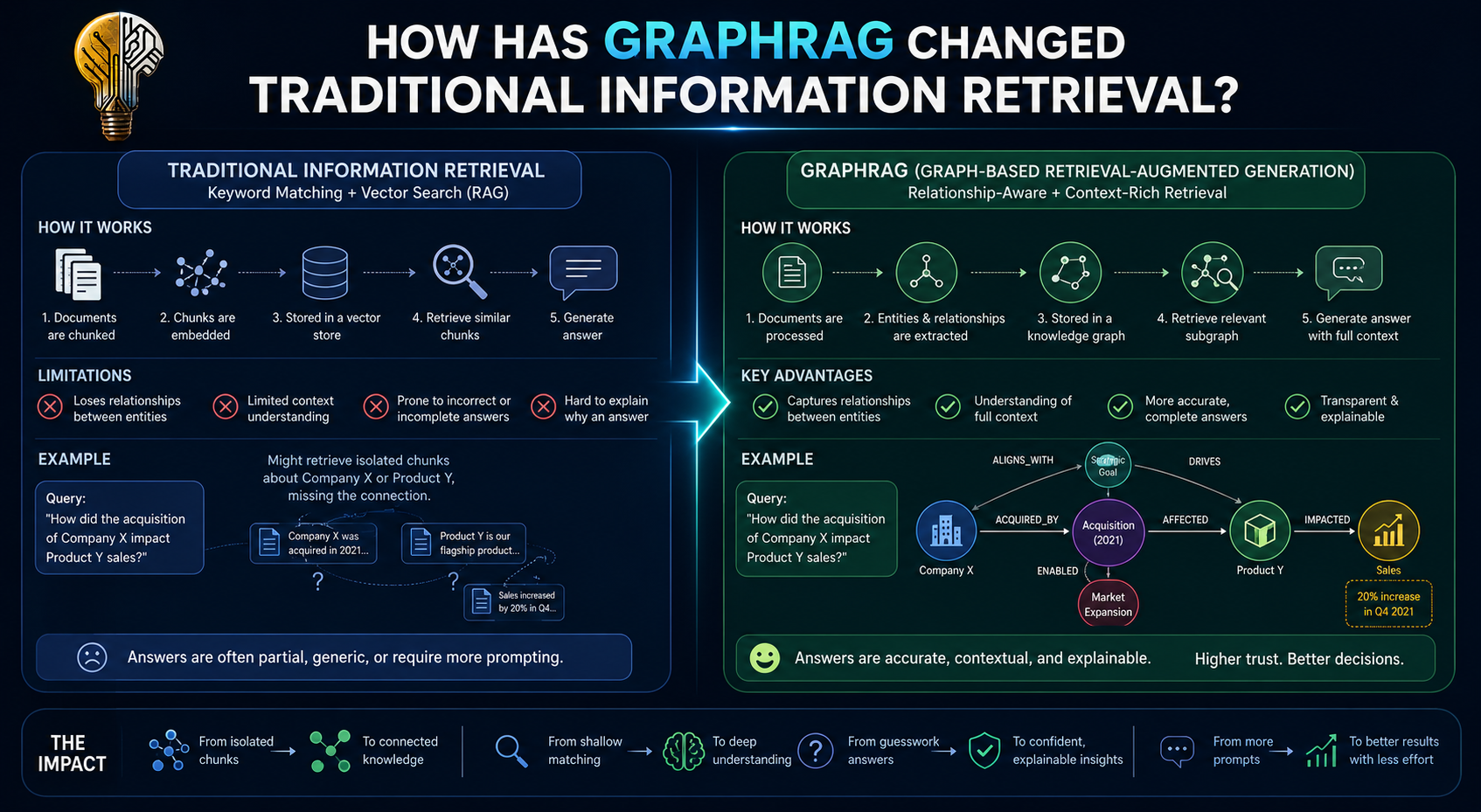
GraphRAG is what you get when you smash together two things we've already talked about: knowledge graphs (the dots-and-lines map) and how AI answers questions using outside information instead of just its memory.
The Problem It Solves
Here's how regular RAG works. RAG stands for "Retrieval-Augmented Generation," which sounds complicated but really just means: "look stuff up before answering, instead of guessing from memory." When you ask an AI a question, instead of only relying on whatever it memorized way back during training (which can be wrong or outdated), it goes and searches through a pile of documents, grabs the bits that seem relevant, and uses those bits to write its answer. This helps stop the AI from just making things up.
But regular RAG has a real weak spot. It's good at finding text that sounds like your question — kind of like a librarian who's great at matching keywords. But it's bad at connecting facts that are scattered across totally different documents that never mention each other. If the answer needs a fact from Document A combined with a fact from Document B, and neither document ever references the other, a plain keyword-style search often just... misses it completely. It's like trying to find your way from your house to your friend's house using only a pile of separate photos of individual streets — no map connecting them, no way to tell which street leads to which.
What GraphRAG Does Differently
GraphRAG pulls its information from a knowledge graph instead of (or alongside) plain chunks of text. Since the graph already has the dots and lines mapped out — this connects to that, that connects to this — the AI can literally follow a trail of connections to answer questions that need several steps of reasoning strung together. This is the exact same kind of multi-hop question we built the arXiv graph to answer.
Example: "What products does the company that bought the startup my old coworker founded make?"
- Plain RAG: struggles hard here, because probably no single document says all of that in one place. It's four separate facts stitched together.
- GraphRAG: just walks the chain:
coworker → founded → startup → bought by → company → makes → products. It follows the dots one hop at a time, like following a trail of stepping stones across a river instead of trying to jump the whole way at once.
Roughly How It Works
- Build the graph — an AI model reads through a pile of documents and pulls out the "things" and "connections" — turning messy paragraphs into the same dots-and-lines structure we built with the arXiv papers.
- Group similar stuff together — the graph gets sorted into clusters of closely related dots (this is the same kind of grouping technique — called community detection — we mentioned could run on top of a graph database like Neo4j).
- When you ask a question — instead of just grabbing text that sounds similar to your question, the system finds the relevant dots in the graph, walks along the connected lines, and pulls out a clear, traceable set of facts — like showing its work.
- Writing the answer — the AI then writes its final answer using those pulled-out facts as its foundation, the same basic idea as regular RAG, just built on a sturdier foundation of connected facts instead of loose chunks of text.
Why It Actually Matters
- Multi-step questions get answered correctly instead of just quietly failing.
- Answers become traceable — you can point to the exact path through the graph that produced the answer. That matters a lot in fields like law, medicine, or finance, where someone might reasonably ask, "okay, but how did the AI know that?" and you need a real answer, not a shrug.
- It's better at summarizing across a huge pile of documents at once, since it can use those grouped clusters to reason about big-picture themes across hundreds of documents — instead of only looking at the handful of text chunks that happened to match your search the best.
Microsoft Research is the one who popularized this idea, and they released their own open-source version of it in 2024 — which is basically why the term "GraphRAG" suddenly started showing up everywhere.
GraphRAG's Two Phases -
Building the Map, Then Using It
GraphRAG actually happens in two completely separate stages, at two completely different times. One happens once, way ahead of time. The other happens every single time someone asks a question. It's a lot like the difference between writing a textbook and then, later, someone flipping through it to find an answer — writing the book happens once; people searching through it happens over and over, forever, without anyone needing to rewrite the book each time.
Phase 1 — Indexing (done once, ahead of time): this is where the graph itself gets built. Phase 2 — Query time (runs every time someone asks something): this is where the graph actually gets used to answer a question.
Let's go through both.
Phase 1 - Indexing — Building the Graph
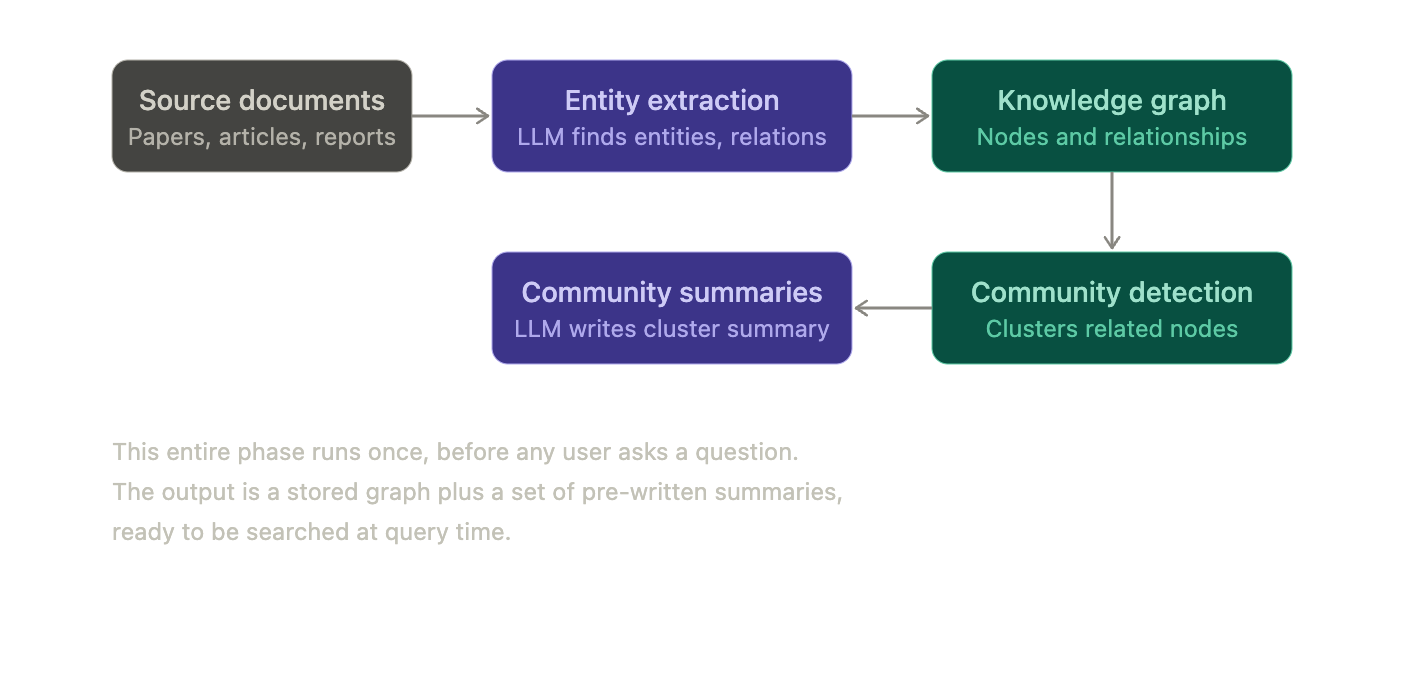
Entity extraction. An AI model reads through a big pile of documents and pulls out the "things" and the "connections between things" — the same basic idea as our arXiv project, except with one key difference. In the arXiv project, we wrote the rules ourselves ("grab the author field, grab the category field"). Here, the AI reads plain paragraphs of regular text and figures out on its own what counts as a "thing" and what connects to what. It's the difference between filling out a form with labeled boxes versus reading a messy handwritten letter and figuring out on your own who the letter is about and what happened to them.
Community detection. Once the graph exists — all the dots and lines are drawn — an algorithm scans the whole thing and groups tightly-connected clusters of dots together. Think of it like sorting a big graph into neighborhoods: dots that are all closely linked to each other get grouped into the same "neighborhood," separate from other neighborhoods that aren't as connected. Each of these neighborhoods then gets its own short, pre-written summary — basically a little blurb describing "here's roughly what this cluster is about."
This step is what makes GraphRAG good at big-picture questions like "summarize everything in this whole pile of documents." Instead of the AI having to individually read through thousands of separate facts every time someone asks a broad question, it can just skim through a much smaller stack of neighborhood summaries instead. It's the difference between reading every single page of a 500-page book versus reading the one-paragraph summary at the start of each chapter.
Phase 2 - Query Time — Actually Answering a Question
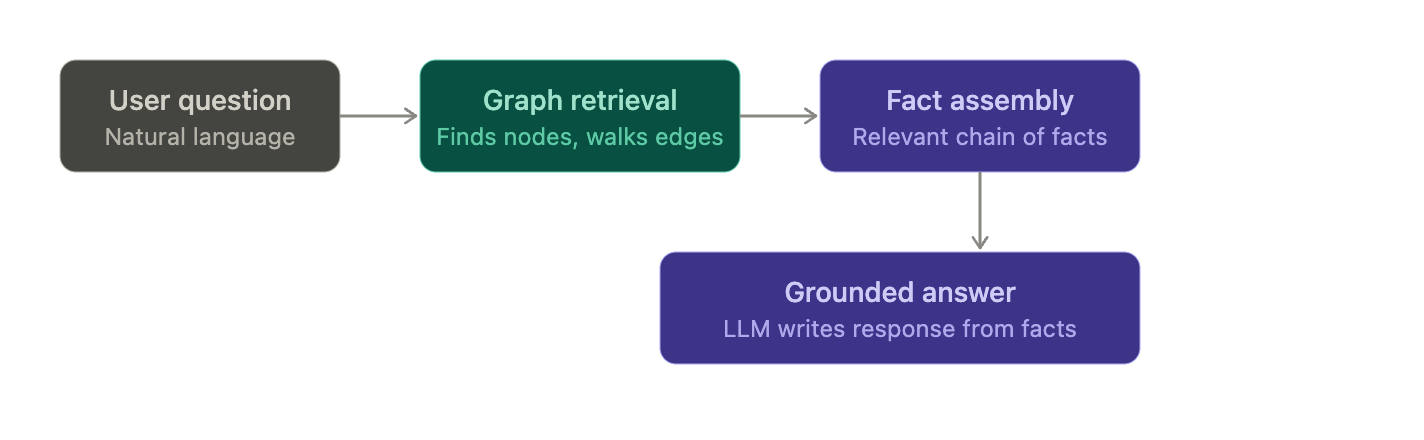
Graph retrieval. When someone actually asks a question, the system has two different strategies it can reach for:
- Local search — start from the specific dots that match the question, then walk outward along their direct connections. This works well for narrow, specific questions — like "who did this one person work with?"
- Global search — instead of starting from specific dots, use those pre-written neighborhood summaries from the indexing phase. This works well for broad, thematic questions — like "what are the main research trends happening across this whole pile of papers?"
It's a bit like the difference between looking up one specific kid's class schedule (local) versus asking "what's this whole school generally interested in?" and getting handed a few teachers' summaries of what each grade level has been working on (global), instead of every kid's individual schedule.
Fact assembly. Whatever gets pulled out — specific dots, specific connections, or neighborhood summaries — gets packaged up into a neat, organized little bundle of facts. This is basically the same move plain RAG makes when it hands the AI a stack of matching text chunks, except here, instead of loose chunks of text, it's a tidy bundle of verified facts and exactly how they connect to each other.
Grounded answer. Finally, the AI writes its actual answer, but it's only allowed to use the bundle of facts it was just handed — not stuff it half-remembers from training. This is the same rule regular RAG follows: don't make things up, only use what was actually retrieved. It's the difference between answering a test question from your notes versus answering from a vague guess.
How This Maps Onto Your arXiv Project
Here's the useful part: the indexing phase is basically exactly what was already planned for the arXiv project — loading papers, authors, categories, and citations into Neo4j as dots and lines. That part's already covered.
Adding GraphRAG on top of it would mean two extra additions:
- Layering in an AI-driven retrieval step that walks the graph at question-answering time, instead of only running the hand-written Cypher queries from before
- Optionally running community detection over the citation network, so the graph auto-generates its own topic summaries — instead of you having to manually decide what counts as a "topic" or "subfield"
So the arXiv project isn't a separate thing from GraphRAG — it's actually the first half of it. The graph-building part was already the plan. GraphRAG is just what you'd call it once you add the AI-powered question-answering layer on top.
Actually Building GraphRAG: Turning the Map Into a Question-Answering Machine
We already built the foundation — a Neo4j graph with papers, authors, and categories all connected. Now comes the missing piece: the part that actually lets you ask the graph questions and get real answers back.
This picks up exactly where the last project left off. If you haven't built that graph yet, go back and do that part first — everything here assumes papers, authors, and citations are already sitting inside Neo4j.
What We're Adding
Right now, our graph only knows "hard facts" — who wrote what, what's in what category. But it doesn't know anything about what's actually inside each paper. GraphRAG needs one more layer: entities and connections pulled straight out of the actual text of each paper's summary. That's the difference between a graph that can answer "who wrote this?" and one that can answer "what methods does this paper actually use?"
The full pipeline has four parts:
- Extract — pull entities and relationships out of each paper's summary using an AI
- Load — add those new entities into the existing Neo4j graph
- Cluster — group the graph into related neighborhoods and write a summary for each one
- Query — pull out relevant facts when someone asks a question, and generate a real answer
Step 1: Pull Entities Out of the Summaries
For each paper, we ask an AI to read its summary and pull out things like: what methods it uses, what datasets, what tasks, what concepts — and how those things relate to each other. This is the step that turns a plain paragraph of English into graph-shaped material — dots and lines the computer can actually work with.
import anthropic
import json

client = anthropic.Anthropic()

EXTRACTION_PROMPT = """Read this paper abstract and extract entities and relationships.

Entity types to look for: Method, Dataset, Task, Concept, Metric
Relationship types: USES, EVALUATES_ON, IMPROVES, PROPOSES, COMPARES_TO

Return ONLY valid JSON in this exact format, nothing else:
{{
  "entities": [{{"name": "...", "type": "..."}}],
  "relationships": [{{"source": "...", "relation": "...", "target": "..."}}]
}}

Abstract:
{abstract}
"""

def extract_entities(paper_id, abstract):
    response = client.messages.create(
        model="claude-sonnet-4-6",
        max_tokens=1000,
        messages=[{"role": "user", "content": EXTRACTION_PROMPT.format(abstract=abstract)}]
    )
    raw = response.content[0].text.strip()
    raw = raw.replace("```json", "").replace("```", "").strip()

    try:
        data = json.loads(raw)
        data["paper_id"] = paper_id
        return data
    except json.JSONDecodeError:
        print(f"Failed to parse extraction for {paper_id}")
        return None
Then we just run this over every paper's summary and save the results:
results = []
for paper in papers:  # papers loaded from your arxiv-metadata file
    extracted = extract_entities(paper["id"], paper["abstract"])
    if extracted:
        results.append(extracted)

with open("extracted_entities.jsonl", "w") as f:
    for r in results:
        f.write(json.dumps(r) + "\n")
A cost warning worth knowing: this step asks the AI a question once for every single paper. For a small test with a few hundred papers, that's cheap and fast — no big deal. But if you tried to do this across arXiv's full 2.3 million papers, this single step is where a real project would need to spend serious money and computer time. It's by far the most expensive stage of the entire pipeline. Keep the test dataset small on purpose — this is like the difference between proofreading your own short story versus trying to proofread every book in the library.
Step 2: Load Those Entities Into Neo4j
Now we take that extracted data and turn it into the same dots-and-lines shape as before, wired up to the papers we already have in the graph:
from neo4j import GraphDatabase

driver = GraphDatabase.driver("bolt://localhost:7687", auth=("neo4j", "your_password"))

def load_extraction(tx, record):
    paper_id = record["paper_id"]

    for entity in record["entities"]:
        tx.run("""
            MERGE (e:Entity {name: $name})
            SET e.type = $type
            WITH e
            MATCH (p:Paper {id: $paper_id})
            MERGE (p)-[:MENTIONS]->(e)
        """, name=entity["name"], type=entity["type"], paper_id=paper_id)

    for rel in record["relationships"]:
        tx.run("""
            MERGE (a:Entity {name: $source})
            MERGE (b:Entity {name: $target})
            MERGE (a)-[r:RELATES_TO {type: $relation}]->(b)
        """, source=rel["source"], target=rel["target"], relation=rel["relation"])

with open("extracted_entities.jsonl") as f:
    records = [json.loads(line) for line in f]

with driver.session() as session:
    for record in records:
        session.execute_write(load_extraction, record)
At this point, the graph has grown up. It used to just be Paper, Author, Category. Now papers MENTION things like methods and datasets, and those things RELATE_TO each other too. This richer, more detailed graph is what GraphRAG actually thinks with.
Step 3: Group Related Stuff Together and Summarize It
This is the part that makes GraphRAG good at big, broad questions instead of only narrow ones. We group the graph into clusters of tightly-connected dots, then ask an AI to write a short summary of what each cluster is "about" — kind of like sorting your class into project groups based on who's already been hanging out with who, then writing one sentence describing what each group seems interested in.
Neo4j has a built-in tool for this kind of grouping. First you install the plugin, then run:
// Project the graph into memory for the algorithm to work on
CALL gds.graph.project(
  'entityGraph',
  'Entity',
  {RELATES_TO: {orientation: 'UNDIRECTED'}}
)
// Run Louvain community detection and write the cluster ID back onto each node
CALL gds.louvain.write('entityGraph', {
  writeProperty: 'community'
})
YIELD communityCount, modularity
Now every Entity dot has a "community" number stamped on it. Dots with the same number were found to be densely connected — probably part of the same sub-topic.
Next, we grab each group's entities and ask the AI to summarize what connects them:
def get_community_entities(tx, community_id):
    result = tx.run("""
        MATCH (e:Entity {community: $community_id})
        RETURN e.name AS name, e.type AS type
    """, community_id=community_id)
    return [dict(record) for record in result]

def summarize_community(entities):
    entity_list = "\n".join(f"- {e['name']} ({e['type']})" for e in entities)
    prompt = f"""These entities were found clustered together in a research paper graph:

{entity_list}

Write a 2-3 sentence summary of what research theme or topic connects these entities."""

    response = client.messages.create(
        model="claude-sonnet-4-6",
        max_tokens=300,
        messages=[{"role": "user", "content": prompt}]
    )
    return response.content[0].text.strip()

with driver.session() as session:
    community_ids = session.execute_read(lambda tx: tx.run(
        "MATCH (e:Entity) RETURN DISTINCT e.community AS id"
    ).value())

    for cid in community_ids:
        entities = session.execute_read(get_community_entities, cid)
        summary = summarize_community(entities)

        session.execute_write(lambda tx: tx.run("""
            MERGE (c:Community {id: $id})
            SET c.summary = $summary
        """, id=cid, summary=summary))
Now every cluster has a ready-made summary sitting in the graph, waiting to be searched — nobody has to re-read every paper from scratch every time someone asks a big-picture question.
Step 4: Answering Narrow Questions — Local Search
Local search handles specific, narrow questions by starting at matching entities and stepping outward one hop at a time.
def local_search(question):
    # Find entities in the graph whose names appear in the question
    with driver.session() as session:
        entities = session.execute_read(lambda tx: tx.run("""
            MATCH (e:Entity)
            WHERE toLower($question) CONTAINS toLower(e.name)
            RETURN e.name AS name
        """, question=question).value())

        if not entities:
            return None

        # Walk one hop out from each matched entity to gather context
        facts = session.execute_read(lambda tx: tx.run("""
            MATCH (e:Entity)-[r:RELATES_TO]-(other:Entity)
            WHERE e.name IN $entities
            RETURN e.name AS source, r.type AS relation, other.name AS target
            LIMIT 30
        """, entities=entities).data())

    context = "\n".join(f"- {f['source']} {f['relation']} {f['target']}" for f in facts)

    prompt = f"""Answer the question using only these facts from a research paper graph:

{context}

Question: {question}

If the facts don't contain enough information to answer, say so."""

    response = client.messages.create(
        model="claude-sonnet-4-6",
        max_tokens=500,
        messages=[{"role": "user", "content": prompt}]
    )
    return response.content[0].text
This is the simple version. Real systems usually match entities by meaning rather than exact spelling, since people rarely phrase a question using the exact same wording as the graph. That's a natural next upgrade once this basic version is working.
Step 5: Answering Big-Picture Questions — Global Search
Global search handles broad, thematic questions by reasoning over the pre-written cluster summaries instead of digging through individual facts.
def global_search(question):
    with driver.session() as session:
        summaries = session.execute_read(lambda tx: tx.run("""
            MATCH (c:Community)
            RETURN c.summary AS summary
        """).value())

    all_summaries = "\n\n".join(f"Theme {i+1}: {s}" for i, s in enumerate(summaries))

    prompt = f"""Here are summaries of the main research themes found in a paper collection:

{all_summaries}

Question: {question}

Answer the question using these themes. Reference which themes are relevant."""

    response = client.messages.create(
        model="claude-sonnet-4-6",
        max_tokens=600,
        messages=[{"role": "user", "content": prompt}]
    )
    return response.content[0].text
Step 6: Deciding Which Search Mode to Use
The last piece is figuring out, for any given question, whether it needs the narrow local search or the big-picture global search. A simple approach that's good enough for a test:
def answer_question(question):
    broad_signals = ["overall", "main themes", "trends", "in general", "across", "summarize"]

    if any(signal in question.lower() for signal in broad_signals):
        return global_search(question)

    result = local_search(question)
    if result is None:
        return global_search(question)  # fall back if no entities matched
    return result
Real GraphRAG systems (like the one Microsoft open-sourced) use a smarter router — sometimes even asking an AI to decide which mode fits best. For a first test, just checking for certain keywords is good enough to prove the whole idea actually works.
Trying It Out
print(answer_question("What methods does this paper use to evaluate performance?"))
print(answer_question("What are the main research themes across this paper collection?"))
The first question should trigger local search — pulling a specific, narrow chain of facts about one method. The second should trigger global search — reasoning across all the cluster summaries to describe the whole collection's shape.
What This Proves — and What's Still Missing
This test proves the whole GraphRAG loop actually works, start to finish: text → extracted graph → clustered summaries → question-aware retrieval → grounded answer. A real, full-scale version would need a few more upgrades on top:
- Smarter matching, so a question phrased differently than the exact entity name still finds the right dots
- Incremental updates — only running extraction on brand-new papers, instead of redoing the whole dataset every single time
- Better summarization for huge graphs — summaries of summaries, for datasets way bigger than this
- Citation-aware retrieval — combining the "who cites what" connections from the original graph with this new entity-level graph, so answers can reason about which paper actually introduced an idea first, not just what connects to what